Developer guide
This guide provides an overview of the software design of pansat and outlines the responsibilities of different parts of the code.
Code structure
The pansat package currently has 4 submodules with different responsibilities:
The
pansat.productscontains the product class representing different data products. These classes provide the main interface for the user to download data.The
pansat.downloadmodule contains the code which is responsible for downloading the data for different products. It acts as an abstraction layer to decouple the data products from their download location.The
pansat.formatsmodule contains interfaces to open data from different file formats.The
pansat.cataloguemodule provides functionality to catalogue downloaded satellite, reanalysis and other meteorological data.
For more information on each submodule, refer to the respective source code documentation.
Key design concepts
pansat aims to provide a unified interface to download and access a wide range of satellite, reanalysis and other meteorological data. Unfortunately, this data and how to access it varies widely and is difficult to handle in a consistent way. In an attempt to overcome these difficulties, pansat uses an object-oriented design to decouple its components and make it sufficiently expressive and flexible to handle a wide range of data products.
Products and data providers
pansat separates the responsibilities for downloading and representing data
products. The reason for this is that products may be available from different
providers and providers may in turn provide multiple products. pansat therefore
uses product classes to represent data products and data provider classes to
represent sources from which product files can be downloaded. The interaction
between those classes is defined by the
DataProvider and
Product abstract base classes.
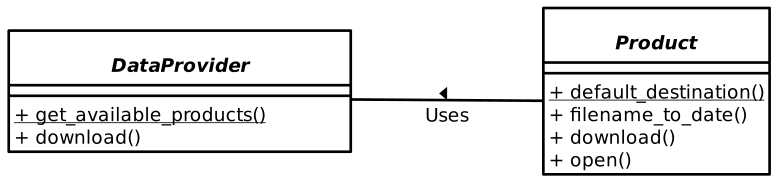
The interaction between these classes is illustrated in the graphic below. Each
data provider provides a static method
get_available_products(),
which returns a list of products names that are available from this data
provider. When a user wants to download a product the products searches through
the list of available providers and instantiates a provider that can download
the product. It then forward the task of downloading the files to the provider.
Adding products
Adding new products to pansat therefore typically involves the following steps:
Add a new product class to the
pansat.productsmodule. Instances of this class represent specific variants of the product. For satellite data there variants may be different processing levels (1, 2, 3), for reanalysis data they may be specific selections of variables.Add a data provider class to the
pansat.download.providersmodule. This data provider class should provide the interface to download files for all variants of your newly created product. This data provider must list the name of your newly added product in the list returned by itsget_available_productsmethod. The data provider must also be added toALL_PROVIDERSlist of all available providers.
Contributing
Everyone is welcome to expand the functionality and capabilities of pansat. To do so, either start by opening an issue on the pansat’s GitHub repository or by opening a pull request with your proposed changes or addition.