ERA5
ERA5 products can be downloaded from https://cds.climate.copernicus.eu/#!/home by using the download method of the corresponding product object. For this example we will have a look at the surface temperature of the ERA5 product on single levels at monthly resolution.
Download data
[1]:
from datetime import datetime
from pansat.products.reanalysis.era5 import ERA5Monthly

t_0 = datetime(2000, 5, 1, 0)
t_1 = datetime(2000, 9, 1, 0)

# create product instance
global_srfc_temps = ERA5Monthly('surface', ['2m_temperature'])
[4]:
files = global_srfc_temps.download(t_0, t_1)
The variable files now contains the downloaded files. Now we can open the data of a given file by calling the ERA5Product.open() method. This will return an xarray dataset object, which is easy to handle.
[6]:
temp_data = global_srfc_temps.open(filename = files[0])

# display xarray dataset object with its dimensions, coordinates, variables and attributes:
display(temp_data)
<xarray.Dataset>
Dimensions:    (latitude: 721, longitude: 1440, time: 1)
Coordinates:
  * longitude  (longitude) float32 0.0 0.25 0.5 0.75 ... 359.25 359.5 359.75
  * latitude   (latitude) float32 90.0 89.75 89.5 89.25 ... -89.5 -89.75 -90.0
  * time       (time) datetime64[ns] 2000-05-01
Data variables:
    t2m        (time, latitude, longitude) float32 ...
Attributes:
    Conventions:  CF-1.6
    history:      2021-01-19 19:19:23 GMT by grib_to_netcdf-2.16.0: /opt/ecmw...
xarray.Dataset
- latitude: 721
- longitude: 1440
- time: 1
- longitude(longitude)float320.0 0.25 0.5 ... 359.5 359.75
- units :
- degrees_east
- long_name :
- longitude
array([0.0000e+00, 2.5000e-01, 5.0000e-01, ..., 3.5925e+02, 3.5950e+02, 3.5975e+02], dtype=float32) - latitude(latitude)float3290.0 89.75 89.5 ... -89.75 -90.0
- units :
- degrees_north
- long_name :
- latitude
array([ 90. , 89.75, 89.5 , ..., -89.5 , -89.75, -90. ], dtype=float32)
- time(time)datetime64[ns]2000-05-01
- long_name :
- time
array(['2000-05-01T00:00:00.000000000'], dtype='datetime64[ns]')
- t2m(time, latitude, longitude)float32...
- units :
- K
- long_name :
- 2 metre temperature
[1038240 values with dtype=float32]
- Conventions :
- CF-1.6
- history :
- 2021-01-19 19:19:23 GMT by grib_to_netcdf-2.16.0: /opt/ecmwf/eccodes/bin/grib_to_netcdf -S param -o /cache/data6/adaptor.mars.internal-1611083963.3064861-11484-26-333dc667-be6e-4d07-8826-20ad484d5b75.nc /cache/tmp/333dc667-be6e-4d07-8826-20ad484d5b75-adaptor.mars.internal-1611083963.3073134-11484-10-tmp.grib
Plot data
[7]:
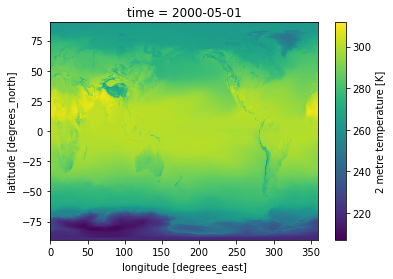
# using xarrays inbuild plot function
temp_data.t2m[0].plot.pcolormesh()
[7]:
<matplotlib.collections.QuadMesh at 0x7f9e32092400>
[8]:
# get data points
temps = temp_data.t2m[0]
lons = temp_data.longitude
lats = temp_data.latitude
[9]:
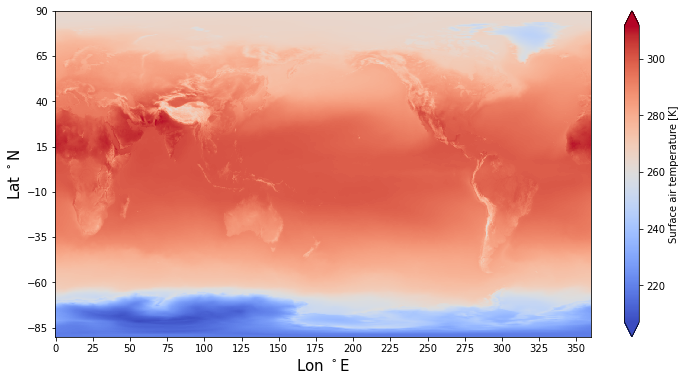
# customize your own plot
%matplotlib inline
import matplotlib.pyplot as plt

plt.figure(figsize=(12, 6))
fontsize= 15
plt.pcolormesh(lons, lats, temps, shading = 'auto', cmap = 'coolwarm')
plt.colorbar(label="Surface air temperature [K]", extend = 'both')
plt.xticks(lons[::100])
plt.yticks(lats[::100])
plt.xlabel('Lon $^\circ$E', fontsize= fontsize)
plt.ylabel('Lat $^\circ$N', fontsize= fontsize);
Subset domain
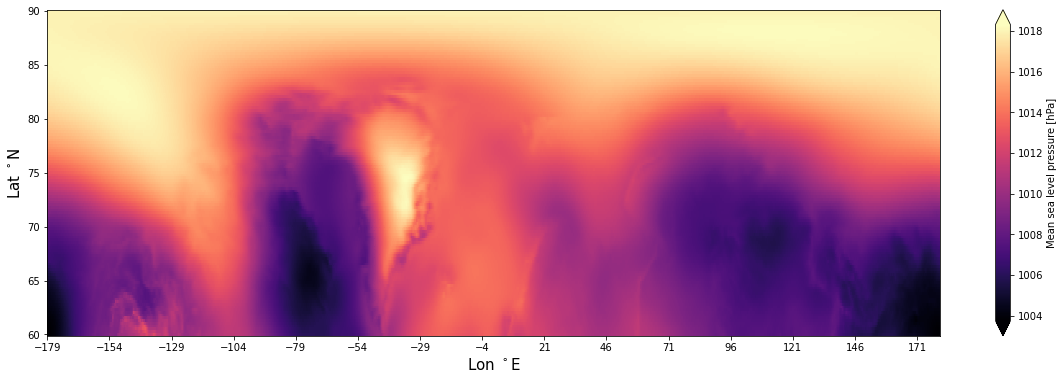
You may want to subset the dataset, in order to extract a specific region of the globe:
[5]:
t_0 = datetime(1999, 8, 1, 0)
t_1 = datetime(1999, 9, 1, 0)

# create product instance
arctic_srfc_temps = ERA5Monthly('surface', ['mean_sea_level_pressure'], [60,90,-179, 180])

# download
files = arctic_srfc_temps.download(t_0, t_1)
[10]:
# open file
arctic_data = arctic_srfc_temps.open(filename = files[0])
# get data points as numpy arrays
arctic_pressure = arctic_data.msl[0].values
lons = arctic_data.longitude.values
lats = arctic_data.latitude.values


# customize your own plot
%matplotlib inline
import matplotlib.pyplot as plt
plt.figure(figsize= (20, 6))
fontsize= 15
plt.pcolormesh(lons, lats, arctic_pressure/100, shading = 'auto', cmap = 'magma')
plt.colorbar(label="Mean sea level pressure [hPa]", extend = 'both')
plt.xticks(lons[::100])
plt.yticks(lats[::20])
plt.xlabel('Lon $^\circ$E', fontsize= fontsize)
plt.ylabel('Lat $^\circ$N', fontsize= fontsize);